# Obsidian 风格记忆

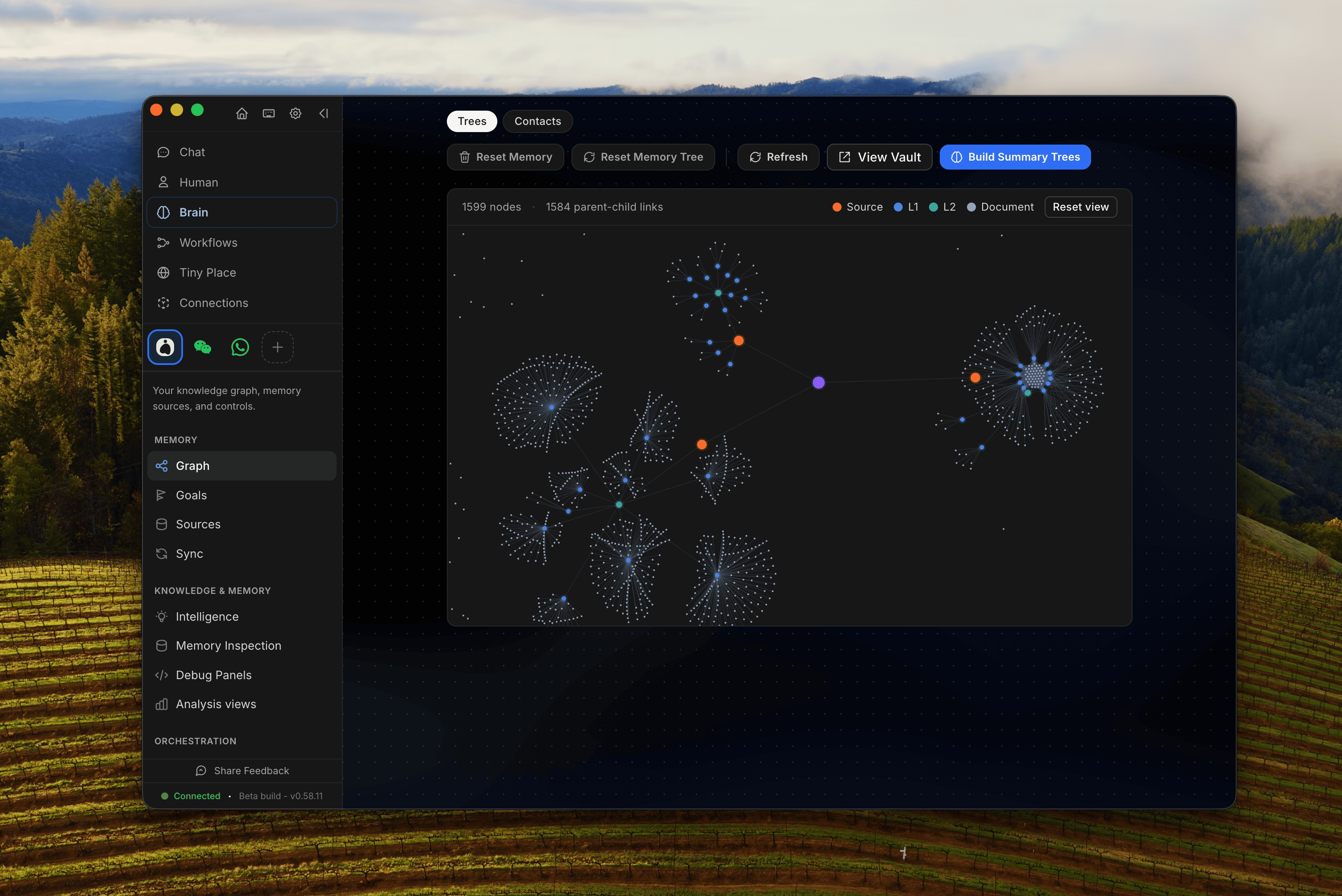
<figure><img src="/files/e3aeaba97d45d721f78ff927e8f8feebbf86cf63" alt=""><figcaption><p>在 Obsidian 中预览 OpenHuman 的记忆。来自各种来源（GMail、Slack、Whatsapp 等）的数据被组织成一棵记忆树。</p></figcaption></figure>

OpenHuman 的记忆不是黑箱。代理推理所用的相同块会以纯 `.md` 文件的形式写入你工作区内的一个 vault。你可以在 [Obsidian](https://obsidian.md)中打开它、浏览它、编辑它，并手动链接笔记，而代理会看到你的修改。

这个设计直接受到 [Andrej Karpathy 的 obsidian-wiki 工作流](https://x.com/karpathy/status/2039805659525644595)的启发：一个个人 wiki，你生活中每件有趣的事最终都会成为可链接的笔记。

## vault 存放的位置

```
<workspace>/
└── wiki/
 ├── summaries/ # 自动生成的来源 / 主题 / 全局摘要
 ├── notes/ # 你手写的笔记（自由格式）
 └── … # 每个已连接的工具包一个文件夹
```

这个 `summaries/` 文件夹按层级布局：全局树按日期，来源树按来源，主题树按实体。每个文件的 frontmatter 都包含来源信息（source ids、时间范围、范围），因此代理可以把任何断言追溯到生成它的块。

## 打开 vault

在桌面应用中， **记忆** 标签页有一个 **“在 Obsidian 中查看 vault”** 按钮。它使用一个 `obsidian://open?path=...` 深度链接，该链接只有在该文件夹 **注册** 为 Obsidian 中的 vault 之后才会生效——深度链接不能替你完成注册。所以第一次需要：

1. 点击 **在 Obsidian 中查看 vault**。如果该文件夹还不是已注册的 vault，OpenHuman 会显示内联指引，而不会静默失败。
2. 在 Obsidian 中，选择 **“将文件夹作为 vault 打开”** 并选择显示的路径——这一步只需要做一次。
3. 点击 **在 Obsidian 中查看 vault** 再次；现在它会直接打开 vault。

如果 Obsidian 安装在非标准位置（Flatpak/Snap/便携版），请使用 **仍然在 Obsidian 中打开**，或者在 **高级** 下把 Obsidian 的配置文件夹路径提供给 OpenHuman，以便检测正常工作。没有安装 Obsidian？指引会链接到下载页面，并且 **显示文件夹** 总会在你的操作系统文件管理器中打开 vault 目录。

你也可以在任何编辑器中打开该文件夹，它就是 Markdown。文件之间的链接使用标准 `[[wiki-link]]` 语法，因此 Obsidian 的图谱视图、反向链接和标签浏览器都能开箱即用。

## 手动编辑笔记

你放入 `wiki/notes/` 中的任何内容都可以被摄取。处理 Gmail 和 Slack 的同一条流水线也会接收你手写的笔记，对它们分块、打分，并将其与其他内容一起整合进主题树和全局树。

这意味着你可以：

* 把会议记录放到 `wiki/notes/2026-05-08-board-call.md` 里，代理明天就会知道上下文。
* 按项目、按人物、按股票代码维护一个文件，主题树会把你的手动笔记视为另一种来源。
* 批量导入现有的 Obsidian vault：把 `.md` 文件放进去并触发摄取。

## 这为什么重要

你无法信任一个你读不出来的记忆。大多数“AI 记忆”系统把状态隐藏在晦涩的嵌入向量中；OpenHuman 的 vault 则相反，代理的记忆 **实际上** 就是一个你拥有的 Markdown 文件夹。如果代理弄错了什么，你可以找到该文件、修正它，而下一次检索就会正确。

它也是最干净的导出方式：明天停止使用 OpenHuman，你仍然会保留一个完整成型的个人 wiki。

## 另请参阅

* [记忆树](/openhuman/zh/gong-neng/obsidian-wiki/memory-tree.md)。生成 vault 的流水线。
* [从集成自动获取](/openhuman/zh/gong-neng/obsidian-wiki/auto-fetch.md)。vault 如何自行增长。


---

# Agent Instructions: Querying This Documentation

If you need additional information that is not directly available in this page, you can query the documentation dynamically by asking a question.

Perform an HTTP GET request on the current page URL with the `ask` query parameter:

```
GET https://tinyhumans.gitbook.io/openhuman/zh/gong-neng/obsidian-wiki.md?ask=<question>
```

The question should be specific, self-contained, and written in natural language.
The response will contain a direct answer to the question and relevant excerpts and sources from the documentation.

Use this mechanism when the answer is not explicitly present in the current page, you need clarification or additional context, or you want to retrieve related documentation sections.